


-
now with latest 64-bit technology, multithreading and numerous improvements - discover the new version
The new imc STUDIO 2022 measurement software
imc STUDIO 2022 is the powerful and modern measurement software platform for your entire test process: From data acquisition and live visualization to automation with test bench open and closed-loop control.
The new version has been completely revised and relies on modern, future-proof technologies such as 64-bit and multithreading. Many central components have been renewed from scratch or completely redesigned. The modern architecture increases performance, especially when handling large amounts of data. We have invested a lot of time to improve features, simplify workflows and get higher stability to improve the user experience. See for yourself and test the demo version.
Older Versions
New features in imc STUDIO 5.2
New features in imc STUDIO 5.0
Future-proof thanks to 64 bit
imc STUDIO 2022 has been completely revised and converted to a 64-bit code base. This means that the software is now based on a modern and future-proof platform that provides the basis for performance gains and ensures compatibility with current and future Windows operating systems. At the same time, previous memory limitations such as the 2 GB file size for measurement files no longer apply.
More performance thanks to multitasking
The new imc STUDIO software comes with a completely revised software architecture that makes wide use of multitasking mechanisms. This opens up great potential for performance enhancement through optimal utilization of modern PC hardware. Multithreading technologies are used to distribute critical functions across several processor cores, making optimum use of the computer's power reserves and thus enabling significant performance gains. For example, while large amounts of data are being streamed from the measuring instrument to the PC, live visualization and real-time data analysis can be performed on the PC with imc Inline FAMOS. And the performance always grows with the currently available and rapidly advancing computer technology and is easily scalable.
The new data format imc3

The new version relies completely on the new powerful file format imc3. A major advantage of this new format is especially the high-performance visualization of large amounts of data in the curve window. The data no longer has to be completely loaded to be viewed. For the curve window, only as much is loaded as is to be displayed. This allows you to scroll and zoom quickly and smoothly, regardless of the amount of data. Storage is robust against interruption and even incomplete files are usable without repair. In addition, the imc EOS monitor channels can be saved in their native envelope format. Prerequisite for loading the generated files in imc FAMOS is version 2021.
New Design

New design applies uniform imc look
Not only the code base was modernized, but also the complete user interface. The software presents itself in a fresh new imc design. The design elements are flatter and more modern, colors have been adapted and icons renewed. Dialogs have also been revised, terminology standardized and much more. The improvements mainly affect the device configuration pages, the logbook, the progress bar, the options and the ribbon. Following are some examples.
Redesigned icons in ribbon menu
The icons in the ribbon menu have been redesigned and present themselves in a modern, clear and intuitive way. Another new feature is that these icons are automatically scaled when used on the panel (as panel buttons).

Improved Usability
New ways of arranging the windows
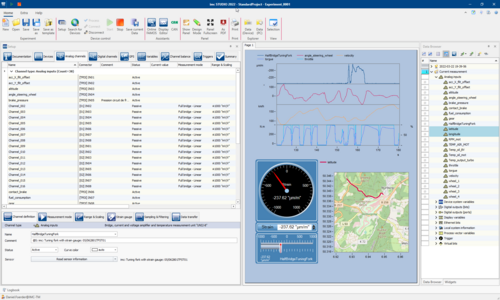
- In the new version, for the first time, different main windows such as setup and panel but also tool windows such as the data browser can be combined and freely arranged in one view. So it is somewhat possible to concentrate a setup table together with a panel page, the data browser and further tools in one single window. Also a specific arrangement on several monitors is possible.
- Furthermore, the logbook can be easily collapsed via an icon. If the logbook pops up because of a message, you can collapse it manually via it.
Data browser with optimized usability
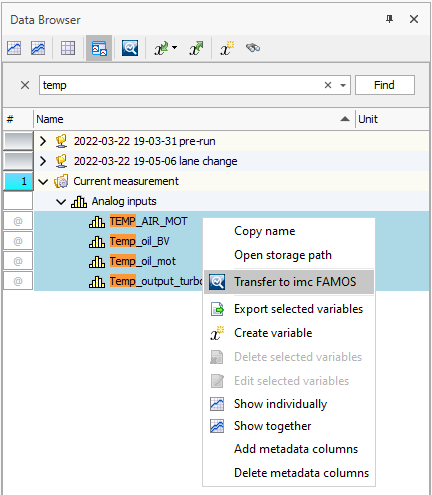
The data browser has been optimized in terms of performance and operation:
- Measurements can be expanded with their associated information without having to fully load all measurement data - only what is needed is loaded.
- Table display and menus have been reduced and made clearer.
- Free text search function allows fast and targeted finding and sorting.
- With a right mouse click, channels and complete measurements with all data and parameters can be transferred directly to imc FAMOS.
- Improved and complete display of event times for multiple triggered measurements.

Optimized project management
- The dialog for loading and saving experiments has been reduced to the essential information and is thus much clearer and easier to use
- With the new menu action "Save as Template" the current configuration is used as a basis for all further new experiments and the devices used there are already selected.
- Experiments can now be copied directly into other projects, including measurement data and all additional information (meta, parameters, ...)
Panel optimizations
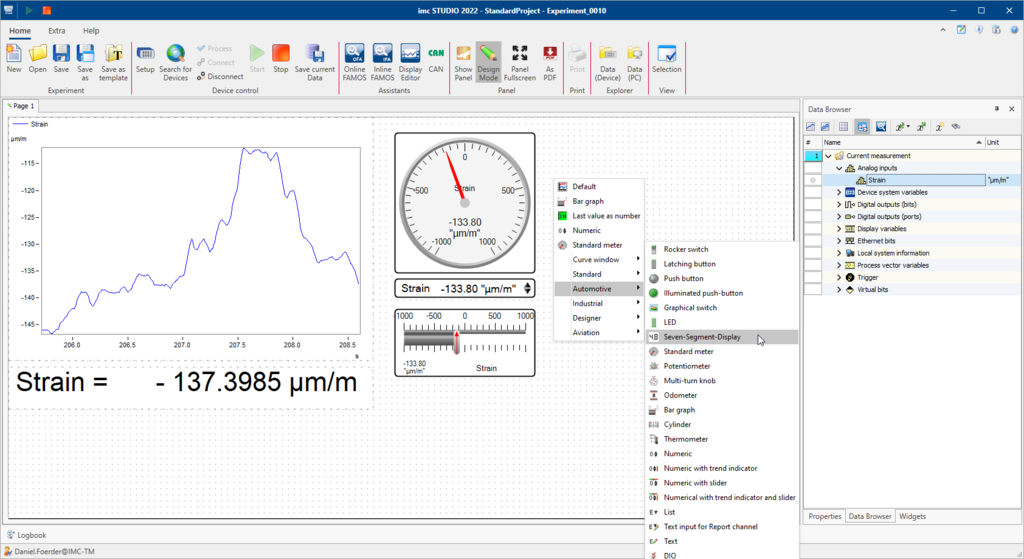
- New favorites list when dragging & dropping channels to the panel: Curve window types or widgets that you have used recently are offered as favorites directly at the top of the list when dragging & dropping from the data browser to the panel.
- New feature allows to adjust panel page to window size without rescaling or moving content (widgets), but keeping their position and size.
Other New Functions
New service information
The date of the last calibration stored in the imc devices is now displayed in the setup as service information. The current status of the hardware thus becomes transparent and helps to plan service intervals in good time.

Sequencer improvements
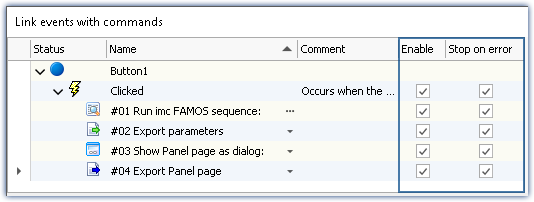
- Temporarily disabling individual commands for debugging purposes is now also possible for event-based sequences such as when linked to a panel button
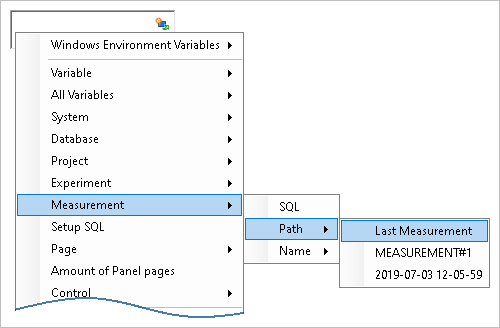
- Especially for use in sequencer commands, there are new placeholders to retrieve and use parameters and paths to the last measurement
Unifications & naming
- The names of the channel categories have been unified between setup, data browser and parameter files (xls)
- "Trigger_ 48" is now called "BaseTrigger
- "1-Trigger" is now called "immediate
Time zones
Devices are now always assigned to one time zone. Time zone conflicts between multiple devices are thus safely resolved.
System Variables
New variables such as user name and user role can be used on the report and are also part of the set of variables of a measurement that can be transferred to imc FAMOS. Other variables are: Measurement status, Connection status, Synchronization status.
Import/export of variables and parameters
Variables can now be both created and overwritten (if they already existed) with a unified Load Variables function.
New Supported Hardware
- imc EOS (MHz Data Acquisition System)
- imc EtherCAT-Gateway (Gateway for connecting imc CRONOSflex modules to external EtherCAT automation systems)
Complete overview of all new features
For a complete overview of all new features, improvements and changes, please download the PDF below:

Older Versions
New features in imc STUDIO 5.2
New features in imc STUDIO 5.0
